BeauteySphere Digital Painter (PssBSDP) -
Order Page - Algorithmic mathematical Software Art
"Create some Beauty with this Software Tool!"
(developed by Professional
Software Solutions)
____________________________________________________________________________________________
Please
note that there are no refunds since you can test the product in full BEFORE you
buy it!
Inquire for special requests at: pss@pobox.com
NO cost for Shipping & Handling -
delivery only
via download -
Each license is linked to a specific
computer.
Before you submit your orders obtain your
Personal Code:
1. Start the License Manager - Start/
2. Enter your email
3. Copy your automatically generated Personal Code:
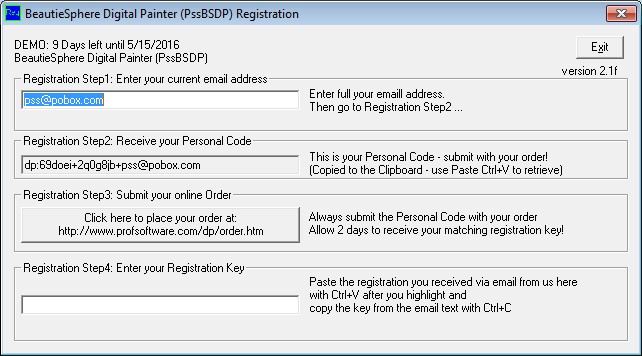
4. Submit your Personal Code with your order request.
(Example:
dp:69doei+2q0g8jb+pss@pobox.com)
| Order
BeauteySphere Digital Painter |
|
$149 - one Year - BeauteySphere Digital Painter
$130
- if paid via US Check/Money Order (13% Discount)
|
|
$249 - Unlimited - BeauteySphere Digital Painter
$220
- if paid via US Check/Money Order (12%
Discount)
|
|
Payment also with PayPalŪ

|
 |
|
|
|
NO cost for Shipping & Handling -
delivery only
via download!
"BeauteySphere Digital Painter" Main Page
(C) Copyright 2005-2016, Burkhard Eichberger, Professional Software Solutions
All Rights Reserved Worldwide.
